Updated October 15, 2026
On October 6, 2026, Tesla expanded Powershare Home Backup to the Model 3 and Model Y. Until then, the Cybertruck was the only Tesla that could help power a home. Now far more Tesla owners are asking us the same question: can my car keep my house running when the power goes out?
The short answer is yes, but with conditions. Your Tesla can extend your home’s backup power during an outage, but only with a Powerwall 3 and a compatible Wall Connector, only if your car has the right hardware, and only as backup. As a Tesla Certified Installer, Rooftop Solar put together what Arizona homeowners need to know before they buy anything.
Key Takeaways
- Powershare Home Backup lets a qualifying Model 3, Model Y, or Cybertruck extend your home’s backup power during a grid outage.
- Model 3 and Model Y require a Powerwall 3 plus a Universal Wall Connector or Wall Connector 3. Tesla says Powerwall 2 and Powerwall+ support is coming soon but has not announced a date.
- Every Model 3 and Model Y ordered in the U.S. on or after October 1, 2026 is capable. Some older cars are too, and you can check yours on the touchscreen in seconds.
- It is a backup feature. A Model 3 or Model Y will not sell energy back to the grid.
- Tesla estimates over two days of added backup for Premium and Performance trims, based on a home using 30 kWh per day. Heavy summer air conditioning in Arizona can shorten that.

What Is Powershare Home Backup?
Powershare is Tesla’s bidirectional charging technology, which lets a compatible vehicle send energy out of its battery instead of only taking it in. Powershare Home Backup is the part of that system designed to keep your home powered during an outage.
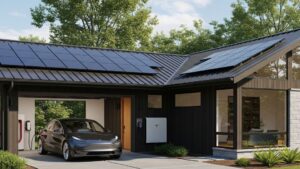
For Model 3 and Model Y owners, it works alongside a Powerwall 3. When the grid goes down, your Powerwall keeps your home running just as it normally would. With your car plugged into a compatible Wall Connector, Tesla says the system detects the outage and automatically draws on your vehicle’s battery to extend your backup duration. If you have solar, your panels keep producing during daylight hours, which Tesla notes can stretch your backup even further.
Think of your car as a large reserve tank for your home battery system. If you are new to home batteries, our guide to how solar battery storage works covers the basics, and our overview of how solar and battery storage work together shows what a typical day looks like.
Do You Need a New Tesla?
Not necessarily. This is the most common misunderstanding we hear. Here is how Tesla defines eligibility:
- Cybertruck: Every Cybertruck trim ever produced is Powershare capable.
- Model 3 and Model Y ordered on or after October 1, 2026: All vehicles ordered in the U.S. and Puerto Rico from that date forward are capable.
- Older Model 3 and Model Y: Some, but not all, are capable. It depends on whether the car was built with Tesla’s bidirectional PCS2 Lite inverter.
- Model S and Model X: These are not on Tesla’s list of Powershare vehicles.
How to Check Your Current Car
You can find out whether your existing Model 3 or Model Y qualifies right from the driver’s seat:
- Tap the vehicle icon in the bottom-left corner of your touchscreen.
- Tap Software.
- Tap Additional Vehicle Information.
- Look for Powershare Support. If the toggle shows as enabled, your car is capable.

If Powershare Support is enabled, you may not need a new car at all. If it is not, that vehicle does not currently support the feature. Not a Tesla App has a helpful walkthrough of the same check.
What Equipment Does Your Home Need?
For a Model 3 or Model Y, Tesla lists these requirements:
- Powerwall 3. Powerwall 3 is compatible today. Tesla says Powerwall 2 and Powerwall+ support is coming soon through an over-the-air update, with no date announced.
- A Universal Wall Connector or Wall Connector 3. Older Wall Connector models are not on Tesla’s list.
- A connected, paired system. Your Powerwall and Wall Connector must be on the same Wi-Fi network, registered to the same site, and paired together.
- Activation by Tesla. Once those conditions are met, you contact Tesla Customer Support to enable Powershare.
If you already have a Powerwall 3 and a compatible Wall Connector, Tesla says no additional equipment is needed. If you have an older Powerwall or no home battery yet, our article on adding a battery to an existing solar system is a good place to start.
A Note for Cybertruck Owners
Cybertruck has an extra option. It can back up a home without a Powerwall by using a Powershare Gateway and a Universal Wall Connector. Model 3 and Model Y do not have that option. If you plan to add a Powerwall as well, Tesla recommends installing the Powerwall first to avoid additional electrical work.
What Powershare Does and Doesn’t Do
What it does:
- Extends your home’s backup power during a grid outage.
- Starts automatically when your car is plugged into a compatible Wall Connector.
- Works with solar, which keeps adding energy during the day.
What it doesn’t do:
- It doesn’t replace a home battery. For Model 3 and Model Y, the car extends a Powerwall 3. It does not stand in for one.
- It doesn’t earn money from the grid. Tesla says Grid Support is not available for Model 3 or Model Y. Tesla offers it only for Cybertruck, and only in certain areas.
- It doesn’t make every Tesla eligible. Older cars without the right hardware and Model S and Model X are not supported.
How Much Backup Can You Expect?
Tesla publishes these estimates for how much a Powershare vehicle can extend your backup:
| Vehicle and Trim | Tesla’s Estimated Backup Duration |
|---|---|
| Cybertruck (all trims) | Over three days |
| Model 3 Standard, Model Y Standard | Up to two days |
| Model 3 and Model Y Premium or Performance | Over two days |
These are Tesla’s estimates based on an average U.S. home using 30 kWh per day and a vehicle starting at 90% charge. Your results will depend on your actual usage, your solar system, and how charged your car is when the outage begins.
What That Means in Arizona
Arizona homes often use far more than 30 kWh a day in summer, mostly for cooling. If an outage hits during a heat wave, expect less backup time than Tesla’s estimate unless you limit what you run. Backing up only essential loads, such as refrigeration, lights, fans, and outlets, can stretch your stored energy much further. Our guide to backing up your home during outages explains how emergency load backup compares with whole-home backup.
Outages here are not only a storm-season concern. APS adopted a Public Safety Power Shutoff program in 2024 and used it for the first time in April 2026. In late June, APS shut off power to about 8,000 customers around Flagstaff and the Grand Canyon to reduce wildfire risk, with outages expected to last 12 to 24 hours. Four Arizona utilities now have shutoff programs in place. A practical tip: keep your car well charged and plugged in when red flag warnings or monsoon storms are in the forecast. For more planning ideas, see preparing for power outages.
Getting Set Up With a Tesla Certified Installer
Tesla relies on Certified Installers to install its home energy and charging products, and the right setup depends on what you already have. Rooftop Solar is a Tesla Certified Installer, and we can help you:
- Confirm whether your current car qualifies before you consider a new one.
- Identify your Powerwall model and Wall Connector, and what, if anything, needs to change.
- Design and install a Powerwall 3 sized to your backup goals, with or without solar.
- Make sure your Powerwall and Wall Connector are installed, registered, and paired correctly, so you are ready when you contact Tesla to enable Powershare.
See what a finished system looks like in our recent Powerwall 3 installation in Peoria.
Frequently Asked Questions
Do I need a new Tesla to use Powershare Home Backup?
Not necessarily. Every Model 3 and Model Y ordered in the U.S. on or after October 1, 2026 is capable, and some older ones are too. Check under Software, then Additional Vehicle Information, on your touchscreen. If Powershare Support is enabled, your current car qualifies.
Do I need a Powerwall?
For a Model 3 or Model Y, yes. Tesla requires a Powerwall 3 today. Only the Cybertruck can back up a home without a Powerwall, using a Powershare Gateway.
I have a Powerwall 2 or Powerwall+. Will it work?
Not yet. Tesla says support for Powerwall 2 and Powerwall+ is coming soon through an over-the-air update but has not announced a date.
Which Wall Connector do I need?
Tesla lists the Universal Wall Connector or Wall Connector 3. It must be on the same Wi-Fi network as your Powerwall, registered to the same site, and paired with it.
Does it work with a Model S or Model X?
No. Tesla’s Powershare vehicle list includes Cybertruck, Model 3, and Model Y only.
Can I sell my car’s energy back to the utility?
Not with a Model 3 or Model Y. Tesla’s Powershare Grid Support program is limited to Cybertruck in certain areas.
Does my home need solar?
Solar is not on Tesla’s list of required equipment, but it is compatible and helps extend your backup by adding energy during daylight hours.
Does it turn on automatically during an outage?
Yes, once it is set up and enabled. Tesla says Powershare Home Backup detects an outage and powers your home automatically when your car is plugged into a compatible Wall Connector.
Does it work with non-Tesla home batteries?
No. Tesla’s requirements for Model 3 and Model Y specify a Powerwall, so other battery brands are not part of this system.
Find Out If Your Home and Your Tesla Are Ready
Whether you already have a Powerwall 3 or are starting from scratch, we can tell you exactly what you have, what you need, and what it takes to put your Tesla to work during the next outage. Schedule a free consultation or call us at (800) 786-7080.
Sources
- Tesla, Powershare: https://www.tesla.com/powershare
- Tesla Support, Tesla Powershare: https://www.tesla.com/support/powershare
- Electrek, Tesla Model 3 and Model Y can finally power your home (Oct. 6, 2026): https://electrek.co/2026/10/06/tesla-powershare-home-backup-model-3-model-y-powerwall-3/
- electrive, Tesla extends home backup functions to Model 3 and Model Y in the US (Oct. 13, 2026): https://electrive.com/2026/10/13/tesla-extends-home-backup-functions-to-model-3-and-model-y-in-the-us
- Not a Tesla App, How to Check If Your Tesla Supports Powershare Home Backup: https://notateslaapp.com/news/4791/how-to-check-if-your-tesla-supports-powershare-home-backup
- KJZZ, How APS decides to turn off power when a wildfire is burning nearby (July 28, 2026): https://www.kjzz.org/the-show/2026-07-28/how-aps-decides-to-turn-off-power-when-a-wildfire-is-burning-nearby
- AZFamily, APS fully restores power to Grand Canyon, Flagstaff after temporary shutoff (June 2026): https://www.azfamily.com/2026/06/26/aps-cut-power-parts-flagstaff-grand-canyon-amid-wildfire-risk/
- ABC15, APS to shut off power to thousands Saturday due to severe fire weather conditions: https://www.abc15.com/news/region-northern-az/flagstaff/aps-may-implement-public-safety-power-shutoff-in-flagstaff-saturday